
Building AI Agents for Enterprise Automation: A Practical Guide
The conversation around enterprise AI has shifted decisively. Chatbots that answer questions are useful, but they are fundamentally reactive – they wait for a user to ask something, produce a response, and stop. Agentic AI represents a qualitatively different paradigm: autonomous software agents that can plan, reason, execute multi-step tasks, and adapt when things go wrong. Gartner named agentic AI its number one strategic technology trend for 2025, and for good reason. The technology is now mature enough to deliver measurable business value in document processing, customer service, procurement, and dozens of other enterprise workflows.
Artificial intelligence originated as an academic discipline in the 1950s, with early AI research focused on replicating aspects of human intelligence through algorithms and symbolic reasoning. AI researchers have since advanced the field by developing new approaches such as machine learning and deep learning, continually pushing the boundaries of what AI systems can achieve. As a branch of computer science, artificial intelligence draws on both theoretical and practical foundations to enable the development of intelligent systems across diverse domains. Additionally, science fiction has played a significant role in shaping public perception and expectations of AI, influencing both enthusiasm and concerns about its potential and ethical implications.
At McKenna Consultants, we have been building AI solutions for enterprise clients across the Microsoft 365 ecosystem and beyond. This article is a practical guide to what AI agents actually are, how they differ from the chatbots you have already deployed, and how to architect agent systems that are powerful enough to be useful yet governed enough to be trustworthy.
What Is an AI Agent?
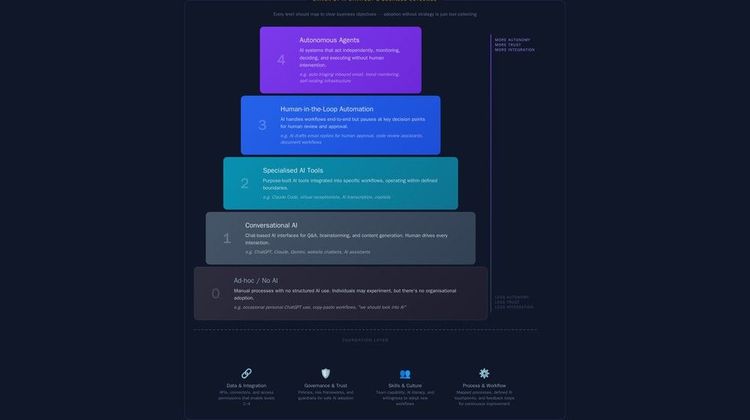
An AI agent is a software system that uses a large language model (LLM) as its reasoning engine to autonomously plan and execute a sequence of actions towards a defined goal. Unlike a simple chatbot, which maps a single input to a single output, an agent operates in a loop: it observes its environment, decides what to do next, takes an action, observes the result, and repeats until the task is complete or it determines it cannot proceed. AI agents operate within specific environments and constraints, making autonomous decisions based on available data, system security, processing capabilities, and resource limitations.
The critical distinction is autonomy. A chatbot answers a question. An agent completes a task. Consider the difference between asking “What is the status of purchase order 4521?” (a chatbot query) and instructing “Process the invoice from Acme Ltd against the correct purchase order, flag any discrepancies, and route for approval” (an agent task). The second requires the system to query a database, match documents, apply business rules, make decisions about discrepancies, and interact with an approval workflow – all without further human input for each step. This demonstrates how AI agents work by automating and enhancing workflows, increasing efficiency and reducing manual intervention.
Unlike traditional software, which is explicitly programmed for each task, agentic AI systems leverage machine learning to learn from data and automate complex processes without the need for detailed programming instructions for every scenario.
The Agent Execution Loop
Most production agent architectures follow a common pattern:
-
Goal reception – The agent receives a task, either from a user prompt, a scheduled trigger, another system, or from other agents in a multi-agent system. User queries are a common way for agents to receive tasks, especially in AI search engines where contextual answers and summaries are generated in response to specific questions posed by users.
-
Planning – The LLM decomposes the goal into a sequence of steps. This might be explicit (a written plan) or implicit (the model deciding on the next action at each iteration).
-
Tool selection – The agent selects from its available tools (APIs, database queries, file operations, web searches) to execute the current step.
-
Execution – The agent calls the selected tool and receives the result.
-
Observation and reasoning – The agent evaluates the result. Did the step succeed? Does the plan need to change? Is the overall goal complete?
-
Iteration or completion – The agent either proceeds to the next step, revises its plan, or returns the final result.
This loop is what makes agents fundamentally more capable than single-turn chatbot interactions. It also introduces the complexity that makes agent development an engineering discipline rather than a prompt-writing exercise.
AI Models and Techniques
Artificial intelligence (AI) is powered by a diverse set of models and techniques that enable machines to perform tasks traditionally requiring human intelligence. From analyzing vast datasets to understanding human language and generating new content, these AI systems form the backbone of modern enterprise automation.
At the core of many AI applications are machine learning techniques, where algorithms are trained on historical data to identify patterns, make predictions, and support decision-making. This approach allows AI agents to perform both complex and repetitive tasks with increasing accuracy over time, adapting to new information as it becomes available.
A significant advancement within machine learning is deep learning, which leverages artificial neural networks inspired by the human brain. These networks consist of multiple layers of interconnected nodes, enabling AI models to process complex patterns in data. Deep learning powers a wide range of AI applications, from computer vision (identifying objects in images) to speech recognition and natural language processing.
Natural language processing (NLP) is a specialized area of AI focused on enabling machines to understand, interpret, and generate human language. NLP is fundamental to building AI agents that can interact with users, respond to queries, and automate communication-heavy workflows. Large language models—such as those used in generative AI tools—are a prime example, capable of engaging in conversation, summarizing documents, and translating languages.
Generative AI represents another transformative technique, where AI models are trained to create new content—text, images, or even computer code—based on patterns learned from existing data. These generative models, including large language models, are increasingly used to automate content creation, support marketing campaigns, and enhance personalized customer experiences.
Foundation models are large, pre-trained AI models that can be fine-tuned for specific tasks or domains. By leveraging knowledge gained from massive datasets, these models accelerate the development of AI applications across a broad range of industries, from eCommerce to healthcare.
Agentic AI takes these capabilities further by orchestrating multiple AI agents—each specialized in specific tasks—to work together on complex workflows. This approach mirrors human collaboration, allowing AI systems to tackle multi-step processes, integrate with external tools, and adapt to changing requirements in real time.
Architecture Patterns: Single-Agent vs Multi-Agent Systems
When designing agentic AI for enterprise automation, the first architectural decision is whether to use a single agent or a multi-agent system. Both patterns have clear use cases, and the choice has significant implications for complexity, reliability, and governance. Multi-agent systems are particularly effective for handling complex tasks that require coordination and specialized expertise.
Single-Agent Architecture
A single agent handles the entire task end-to-end. It has access to all necessary tools and maintains a single reasoning thread. This pattern works well for tasks that are well-defined, linear, and can be accomplished with a moderate number of tool calls.
Suitable for:
-
Document classification and routing
-
Data extraction from structured forms
-
Simple approval workflows
-
FAQ resolution with knowledge base lookup
Advantages: Simpler to build, test, and debug. A single reasoning thread is easier to audit. Latency is lower because there is no inter-agent communication overhead.
Limitations: As the number of tools and the complexity of reasoning grow, a single agent’s performance degrades. LLMs have finite context windows and struggle to maintain coherent plans across dozens of steps with many available tools.
Multi-Agent Architecture with Multiple AI Agents
A multi-agent system decomposes a complex task across multiple specialised agents, each with a focused set of tools and a narrower domain of expertise. An orchestrator agent (sometimes called a supervisor or router) coordinates the work, delegating subtasks to specialist agents and synthesising their results.
Suitable for:
-
End-to-end procurement workflows (requisition, supplier selection, PO creation, invoice matching)
-
Complex customer service scenarios spanning multiple backend systems
-
Document processing pipelines with extraction, validation, enrichment, and routing stages
-
Any workflow where different steps require different expertise or system access
Advantages: Each agent has a smaller, more focused tool set and prompt, which improves reliability. Specialist agents can be developed, tested, and improved independently. The system scales more naturally as workflow complexity grows. This architecture enables collaborative problem solving, as specialised agents work together to address different aspects of a complex challenge.
Limitations: Inter-agent communication introduces latency and potential failure modes. Orchestration logic adds architectural complexity. Debugging requires tracing reasoning across multiple agents.
Choosing the Right Pattern
At McKenna Consultants, we apply a pragmatic rule: start with a single agent. If the task requires more than eight to ten tools, or if distinct phases of the workflow require fundamentally different expertise, refactor into a multi-agent system. Premature decomposition into multiple agents adds complexity without benefit; delayed decomposition leads to unreliable single agents trying to do too much.
Human-in-the-Loop Governance
Enterprise AI agents must operate within governance frameworks that ensure human oversight, auditability, and the ability to intervene. This is not merely a compliance consideration – it is an engineering requirement. Agents that operate without appropriate guardrails will eventually take actions that are incorrect, costly, or reputationally damaging. Human-in-the-loop AI governance is the discipline of designing systems where human oversight and human supervision are built into the agent’s execution loop rather than bolted on after deployment. Explicit human supervision in AI agent systems is essential to prevent unintended or harmful actions, especially in contexts where autonomous decisions could have significant consequences.
Governance Tiers
We recommend a tiered governance model based on the consequence of agent actions:
Tier 1 – Autonomous execution. The agent executes without human approval. Appropriate for low-risk, reversible actions: reading data, classifying documents, generating draft responses.
Tier 2 – Approval required. The agent plans and prepares an action but pauses for human approval before execution. Appropriate for medium-risk actions: sending external communications, creating purchase orders below a threshold, modifying records.
Tier 3 – Human execution. The agent analyses and recommends, but a human performs the action. Appropriate for high-risk or irreversible actions: large financial commitments, legal filings, customer terminations.
The tier assignment should be configurable and reviewable. As the organisation gains confidence in the agent’s reliability for specific action types, actions can be promoted from Tier 3 to Tier 2 or from Tier 2 to Tier 1.
Audit Trails
Every agent action must be logged with sufficient detail to reconstruct the agent’s reasoning. This includes:
-
The original goal or trigger
-
The plan the agent generated
-
Each tool call, its inputs, and its outputs
-
The reasoning the agent applied at each decision point
-
Any human approvals or interventions
-
The final outcome
This audit trail serves multiple purposes: debugging, compliance, continuous improvement, and – critically – building organisational trust in the system.
Microsoft Copilot Studio as an Agent Platform
For organisations invested in the Microsoft 365 ecosystem, Microsoft Copilot Studio has emerged as a compelling platform for building and deploying AI agents. It provides a low-code environment for agent construction while supporting custom code extensions for complex logic. Other major cloud platforms, such as Google Cloud, also play a significant role in AI innovation, offering robust infrastructure and incentives like free credits to support new customers. The availability of substantial computing power on these platforms is crucial for deploying advanced AI agents and driving further progress in artificial intelligence.
Key Capabilities for Enterprise Agents
Connector ecosystem. Copilot Studio agents can access over 1,000 pre-built connectors to Microsoft and third-party services – SharePoint, Dynamics 365, SAP, Salesforce, ServiceNow, and more. This dramatically reduces the integration effort for enterprise workflows.
Custom plugins and actions. For bespoke business logic, Copilot Studio supports custom plugins written in C# or TypeScript, as well as Power Automate flows for orchestrating multi-step processes. This gives development teams the flexibility to implement domain-specific rules that the LLM should not be improvising.
Built-in governance. Copilot Studio provides role-based access control, usage analytics, and integration with Microsoft Purview for data loss prevention. Agents can be scoped to specific data sources and actions, reducing the blast radius of any single agent.
Deployment to Microsoft 365 surfaces. Agents built in Copilot Studio can be surfaced in Teams, Outlook, SharePoint, and other Microsoft 365 applications. This means users interact with agents in the tools they already use, eliminating the adoption friction of standalone interfaces.
When to Use Copilot Studio vs Custom Development
Copilot Studio excels when the workflow can be expressed as a series of connector calls and decision points, and when deployment within Microsoft 365 is a requirement. For highly custom agent architectures – particularly multi-agent systems with complex orchestration – direct development using frameworks such as Semantic Kernel, AutoGen, or LangGraph provides more architectural control. Building these custom agent architectures often requires advanced software development skills and practices to ensure robust integration and scalability. McKenna Consultants helps clients evaluate this decision based on their specific requirements, existing infrastructure, and team capabilities.
Real-World Use Cases
The following use cases illustrate how agentic AI enterprise automation delivers measurable value in production environments. Each represents a pattern we have implemented or are actively developing with clients. These examples demonstrate real world applications of agentic AI in enterprise settings.
Document Processing and Classification with Natural Language Processing
The problem: A professional services firm receives hundreds of documents daily – contracts, invoices, correspondence, regulatory filings – across email, post (scanned), and client portals. Manual classification and routing consumes significant administrative effort and introduces delays.
The agent solution: A document processing agent receives each document, extracts key metadata (document type, client, date, amounts, deadlines), uses artificial intelligence to analyze data extracted from the documents, classifies it against the firm’s taxonomy, and routes it to the correct team and workflow. For standard document types, this operates autonomously (Tier 1). For ambiguous documents, the agent presents its classification with confidence scores and requests human confirmation (Tier 2).
The result: Processing time reduced from hours to minutes. Classification accuracy exceeding 95% for standard document types. Administrative staff redirected to higher-value work.
Customer Service Escalation Management
The problem: A SaaS provider’s support team handles thousands of tickets monthly. Complex tickets require information from multiple backend systems (CRM, billing, product usage analytics, knowledge base), and resolution often involves coordinating across teams.
The agent solution: A multi-agent system where a triage agent classifies incoming tickets and routes them to specialist agents (billing agent, technical agent, account management agent). Each specialist agent has access to the relevant backend systems and can draft responses, initiate refunds below a threshold, or escalate to human agents with a complete context package. AI workflows streamline the escalation and resolution process by automating decision-making steps, ensuring secure and efficient handling of each ticket.
The result: Average resolution time reduced by 40%. Human agents spend their time on genuinely complex cases rather than information gathering. Customer satisfaction scores improved through faster initial response and more accurate routing.
Procurement Workflow Automation
The problem: A manufacturing company’s procurement process involves requisition approval, supplier selection, purchase order creation, goods receipt matching, and invoice processing. Each step involves different systems and different approvers, creating bottlenecks and errors.
The agent solution: Organizations use AI to automate and optimize procurement workflows by deploying an orchestrator agent that manages the end-to-end process, delegating to specialist agents for each phase. The requisition agent validates requests against budget and policy. The sourcing agent compares supplier quotes and recommends selections. The PO agent generates purchase orders and routes them for approval. The matching agent reconciles invoices against POs and goods receipts, flagging discrepancies for human review.
The result: Procurement cycle time reduced by 60%. Invoice matching errors reduced by 85%. Finance team focused on exception handling rather than routine processing.
Implementation Considerations
Building production AI agents for business process automation requires attention to several engineering concerns that are not present in simpler AI applications. Robust AI algorithms are essential for building reliable and effective agent systems, ensuring that these solutions can handle complex tasks and adapt to changing business needs.
Reliability and Error Handling
Agents will encounter unexpected situations: API failures, ambiguous data, tasks that fall outside their training distribution. Robust agent systems need explicit error handling strategies:
-
Retry logic for transient failures (API timeouts, rate limits)
-
Graceful degradation when a tool is unavailable (use alternative data sources, or pause and notify)
-
Confidence thresholds that trigger human escalation when the agent is uncertain
-
Maximum iteration limits to prevent infinite loops
Latency Management
Multi-step agent workflows can accumulate significant latency, particularly when each step involves an LLM call plus a tool call. Strategies for managing this include:
-
Parallel tool execution where steps are independent
-
Caching frequently accessed reference data
-
Using faster, smaller models for simple classification steps within the workflow
-
Streaming intermediate results to users so they see progress
Testing Agent Systems
Testing agents is fundamentally different from testing deterministic software. The same input may produce different execution paths due to LLM non-determinism. Effective testing strategies include:
-
Scenario-based evaluation with defined success criteria rather than exact output matching
-
Golden dataset testing with known-good input/output pairs for each tool call. High-quality training data is essential here, as it provides the foundational patterns and structures needed to accurately evaluate and improve agent performance.
-
Adversarial testing with edge cases, ambiguous inputs, and deliberate attempts to confuse the agent
-
Production monitoring with automated detection of anomalous behaviour patterns
Cost Management
LLM API calls are priced per token, and agent workflows can consume significantly more tokens than single-turn interactions due to the iterative reasoning loop. Cost management strategies include selecting appropriate model sizes for each agent (not every step needs the most capable model), implementing token budgets per task, and caching tool results to reduce redundant LLM calls.
Getting Started with Enterprise AI Agents
For organisations looking to move from chatbots to agentic AI, we recommend a phased approach:
-
Identify a high-value, well-defined workflow – One where the steps are documented, the systems are accessible via API, and the business impact of automation is clear.
-
Start with a single agent – Build a single agent that handles the core happy path. Deploy with Tier 2 governance (human approval for actions).
-
Instrument everything – Log every reasoning step and tool call from day one. This data is essential for debugging, governance, and improvement.
-
Iterate based on production data – Use real-world performance data to identify where the agent struggles, where it needs additional tools, and where governance tiers can be relaxed.
-
Scale to multi-agent when complexity demands it – Refactor into specialised agents only when the single agent’s reliability degrades due to scope.
Conclusion
Agentic AI represents the next significant step in enterprise automation – moving from systems that answer questions to systems that complete tasks. The technology is ready for production use, but successful deployment requires thoughtful architecture, robust governance, and an engineering-first approach to reliability and testing.
McKenna Consultants specialises in AI agent development across the Microsoft 365 ecosystem and beyond. Whether you are exploring your first agent use case or scaling an existing deployment, our team brings the technical depth and enterprise experience to deliver AI solutions that work in production. Contact us to discuss how agentic AI can transform your business processes.